To install the full version of Cobbii-Mon, you'll first need to download the Modrinth App. It's a modern launcher that makes managing modpacks super easy.
You can grab it directly from our website or from the official Modrinth website. (alternatively you can obtain it from our download section)
Go ahead and install it like you would any other app.
Cobbii-Mon is specifically configured to work smoothly on Windows. If you're on macOS or Linux, it might still work - but we can't guarantee full compatibility or support on those systems, so proceed with caution.
Once you've downloaded and installed the Modrinth App, open the launcher. On the first launch, it'll prompt you to sign in with your Microsoft account - the same one you use for Minecraft: Java Edition.
Once you're signed in, all you need to do is download our Cobbii-Mon Modrinth pack from our website.
simply click on it and hit Install. Modrinth will handle the rest.
That's it! Modrinth will take care of downloading and setting everything up for you automatically.
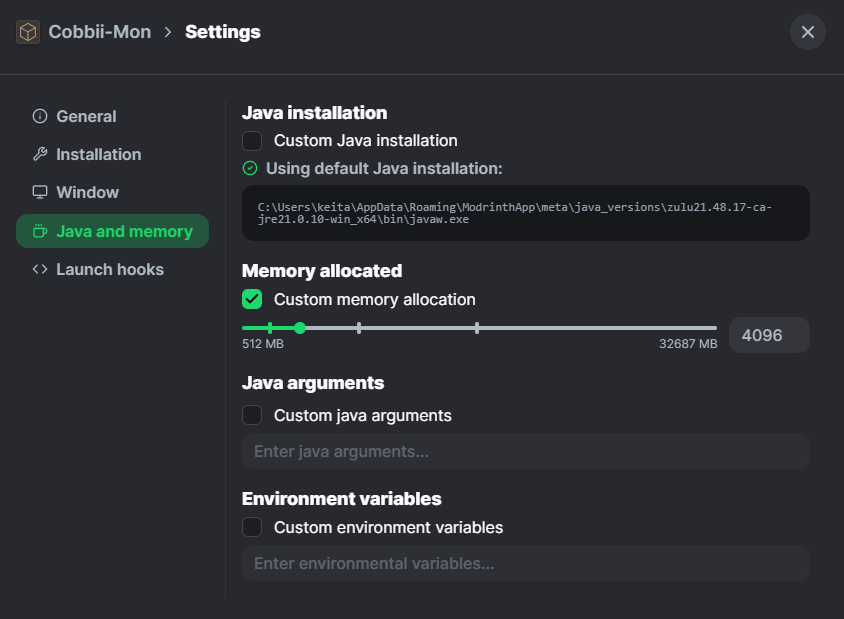
IMPORTANT NOTE: Before launching the game for the first time, make sure to allocate at least 4 GB (4096MB) of RAM.
In the top-right corner, click the gear icon to open Settings.
Allocating this amount of memory ensures that the modpack runs smoothly and without performance issues.
 Allocating this amount of memory ensures that the modpack runs smoothly and without performance issues.